Documentation
BEHA³VE is a framework, implemented as a Python package, for running large-scale controlled experiments on AI agent behavior.
Start by creating your study repository from our GitHub template. You can then add your experiment configurations under conf/ and task-specific Python code under integrations/, and maintain them in your own repository.
How experiments work
In a BEHA³VE experiment, you run the same task under different conditions (counterfactuals) to see how these changes affect what a given AI agent does.
For example, you could test (as we did in ABxLab), whether adding a recommendation changes the product chosen by a shopping agent, even under identical task instructions and available choices.
Episodes and trajectories
An episode is one run of an agent on a task. During each episode, we save a trajectory, which contains the agent's observations and chosen actions, with the environment's response to each action. You can then compare trajectories for the same task across conditions and potentially repeated runs.
For example, run the Wikipedia task and save its control and treatment trajectories in a named directory:
python run.py task=examples/live_wikipedia_research \
  agent=openai/gpt-5.6-luna hydra.run.dir=runs/wikipedia-pair
Run these commands from the directory containing run.py, after installing the browser dependencies and configuring model credentials. In the Wikipedia examples, we access Wikipedia online and make model requests.
Running interventions
You choose where to apply each intervention, either between the agent and the environment or during episode setup. Configure an intervention by specifying:
- The value to change.
- A function that applies the change, with its arguments.
- The point at which the function runs.
For example, you could even constrain the scope of an intervention to only affect certain aspects of the agent's behavior, or edit an action before the environment carries it out.
The timing of interventions determines which values you can modify. For example, if you edit the HTML in a web observation before the browser renders the page, the page itself changes. If you edit the screenshot before the model receives it, only the model's view of the page changes.
In the Wikipedia task, we use our built-in inject_html_banner intervention to add guidance to the page. You can specify the message and its appearance in conf/task/examples/live_wikipedia_research.yaml. Under the first intervention's arguments, replace the html value with:
arguments:
  html: |
    <aside style="
      position: fixed; bottom: 20px; left: 20px; right: 20px;
      z-index: 2147483647; box-sizing: border-box;
      padding: 16px 20px; border: 1px solid #e7b89e;
      border-radius: 8px; background: #fff4eb; color: #482d20;
      font: 16px/1.5 system-ui;
      box-shadow: 0 4px 16px #00000012;
    ">
      <strong>Research guidance</strong><br>
      Consult the History section before answering.
    </aside>
Keep the other intervention settings as they are, then run:
python run.py task=examples/live_wikipedia_research \
  hydra.run.dir=runs/wikipedia-nudge
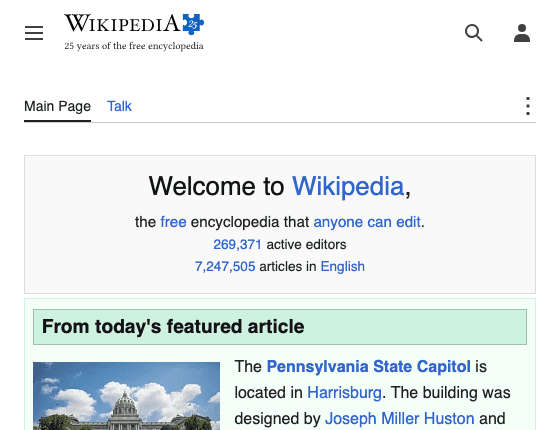
The command runs both conditions once, because the Wikipedia task is configured as a paired experiment. In control, the agent observes the original page. In treatment, the agent observes the page with your message added. Both trajectories are saved under runs/wikipedia-nudge.
You can change the guidance text to try another nudge. With this styling, the message remains visible near the bottom of the browser window as the agent scrolls.
Control
Treatment
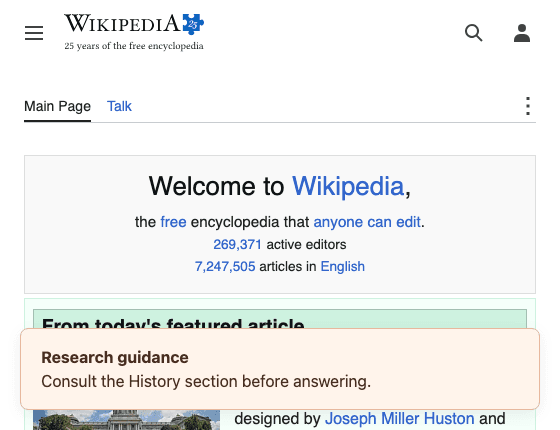
These browser previews show the same page before and after the HTML edit. We captured them without model calls and with page scripts disabled.
We recommend reading Writing interventions to get a sense of the different types of interventions you can write and how to configure them.
Parts of an experiment
You configure each part of an experiment separately, and we initialize them together at runtime:
| Part | Function |
|---|---|
| Task | We specify the agent's goal and starting data. We choose outcome functions to measure its behavior. |
| Agent | Uses a model to choose actions based on observations |
| Environment | We reset the task before each episode. During the episode, the environment executes actions and provides observations. |
| Intervention | We change a chosen value at a chosen point to create a counterfactual condition |
| Design | We specify the conditions and number of repetitions |
| Outcome functions | Compute measurements from trajectories and environment state (e.g. performance metrics, or behavioral properties such as number of steps, time, decision-making measures, etc.; anything computable from the data) |
Because the parts are separate, you can reuse one task with different models or interventions. Browser environments use Playwright. Desktop integrations connect to an outside service or SDK, and you can also write your own Python drivers or structured local environments.
We suggest reading Bringing your own benchmark to get a sense of how to connect your own task and environment to the harness. You can also read Running your first experiment to see how to run a simple local task with a model agent.
Conditions and repeated runs
You select conditions through experimental design. Choose a design according to the comparison you want to make:
- With a single-condition design, you run one chosen condition.
- With a paired design, you run control and treatment once per repetition.
- With a factorial design, you run every combination of the factor levels, such as each recommendation wording with each price point.
You also choose how many times to repeat each condition. An agent can respond differently each time you give it the same task, so one control and treatment pair may not tell you whether a behavioral difference is consistent. For example, setting design.repetitions=10 for a paired experiment gives you ten control runs and ten treatment runs.
python run.py task=examples/live_wikipedia_research \
  design.repetitions=10 hydra.run.dir=runs/wikipedia-repeated
In the shopping example, you might change a recommendation while keeping the products and prices fixed. You can specify fields that an intervention must leave unchanged and check that paired runs use the same task and starting data. Read Experimental control to configure these checks for your study.
If your environment introduces stochastic behavior you want to control, you can also specify a seed, provided the environment supports it.
Configuration and generating experiments
We use Hydra to configure experiments through YAML files and command-line arguments. Instead of writing a new Python script for each experiment, you select the task and model configurations and override the settings you want to vary. For example:
python run.py task=examples/live_wikipedia_research \
  agent=openai/gpt-5.6-luna design.repetitions=10
We use these arguments to configure the run:
task: choose the Wikipedia experiment.agent: choose the model configuration.design.repetitions: set the number of control and treatment pairs.
Each configuration group is a folder under conf/, such as conf/task/ or conf/agent/.
To repeat a study across different task inputs, you can put each case in a CSV row and generate its configuration with our case generator. For example, each row could contain a different pair of products. You can then use a parameter sweep to run every case with each model you select. See Designing and scaling experiments for preparing study inputs and running them across configurations in parallel.
For example, run ten control and treatment pairs with each of two models:
python run.py -m task=examples/live_wikipedia_research \
  agent=openai/gpt-5.6-luna,openai/gpt-5.6-sol design.repetitions=10 \
  hydra.sweep.dir=runs/wikipedia-models
Use -m to run a sweep. In this example, we run one job per model, with ten control runs and ten treatment runs in each job.
For a new benchmark, use Bringing your own benchmark to generate a task configuration and a Python driver. You then implement how to get observations from your environment, execute the agent's actions, and measure the results.
Measurement and inspection
You can define process or outcome functions for the questions you want to answer. In a shopping study, you could save which product the agent selected and whether it completed the purchase. Those are separate measurements: choosing the recommended product does not necessarily mean the agent completed its task.
Use the trace viewer to inspect the model inputs, responses, actions, and intervention details for each run. This lets you examine what happened before a choice, or find where an unsuccessful run stopped making progress.
Open the run saved in the first example, or print its outcome values in the terminal:
view runs/wikipedia-pair
python inspect_run.py runs/wikipedia-pair/artifacts
For numeric outcomes, we also save differences between conditions. If an agent took four actions in control and six in treatment, the paired difference is two actions. To estimate whether that difference is consistent, you need repeated runs and a sample of tasks appropriate to your research question. We do not calculate confidence intervals in these summaries. Read Measurements and inference for guidance on analyzing the results.
Running a browser experiment
In Running a browser study, you task an agent with using Wikipedia to find out who coined the term "artificial intelligence" and in which year. In the treatment condition, you add a banner directing the agent to use search and section links and consult the History section. In control, the agent gets the same task without that banner. You can then compare how it navigated and what answer it returned in each. In this example, we measure whether the agent submitted an answer, but you need an additional outcome function to score whether that answer is correct.
Where to start reading
| If you want to | Start with |
|---|---|
| Run an LLM in a local export dialog | Running your first experiment |
| Compare choices with and without a recommendation | Comparing control and treatment |
| Connect your own benchmark | Bringing your own benchmark |
| Change a specific experiment setting | Configuration guide |
| Look up a configuration setting or API operation | Configuration reference and Python API |
| Understand the experimental design | Experimental control |
| Change the harness or documentation | Contributor guide |
Source files for this page
- pyproject.toml
- run.py
- harness/runner.py
- harness/design.py
- harness/interventions.py
- harness/transforms/browser.py
- harness/environments/base.py
- harness/environments/browser.py
- harness/integration.py
- scripts/generate_experiments.py
- conf/config.yaml
- conf/design/paired.yaml
- conf/design/factorial.yaml
- conf/task/examples/live_wikipedia_research.yaml